이 글에서 다루는 것
MLflow에 등록된 모델을 FastAPI로 서빙하고, Stage 기반 핫스왑과 모델 정보 조회 API를 구축합니다.
선수지식
- MLOps 플랫폼 구축 4단계: Airflow GitSync + Secret 연동 — Helm 배포와 Secret 마운트 패턴
이 단계에서 해결하려는 문제
모델을 수동으로 서빙 서버에 복사하면 배포 실수와 버전 불일치가 발생합니다. MLflow Registry에서 Stage별 모델을 자동 로딩하는 구조를 만들어, 코드 변경 없이 모델을 교체할 수 있도록 합니다.
📐 아키텍처 구성도
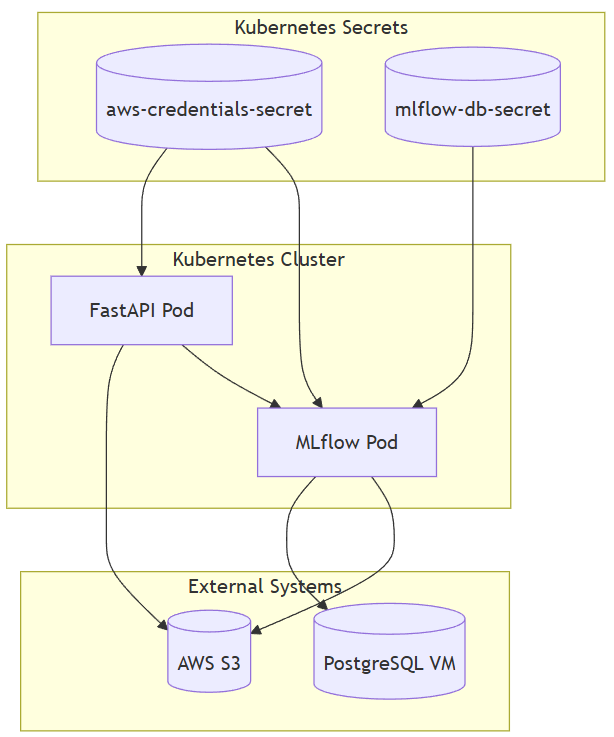
🐳 FastAPI 커스텀 이미지
Dockerfile
FROM python:3.12

WORKDIR /app
COPY app /app
COPY requirements.txt .

RUN pip install --no-cache-dir -r requirements.txt

CMD ["uvicorn", "main:app", "--host", "0.0.0.0", "--port", "8000"]
requirements.txt
fastapi==0.110.2
uvicorn==0.29.0
mlflow==2.13.0
pandas==2.1.4
scikit-learn==1.6.1
pydantic==2.7.1
boto3==1.34.113
numpy==1.26.4
packaging==24.2
psutil==7.0.0
scipy==1.15.3
setuptools==69.5.1
빌드 & 푸시
docker build -t ghcr.io/hoizz/fastapi-ml:mlflow-model-info .
docker push ghcr.io/hoizz/fastapi-ml:mlflow-model-info
📄 app/main.py (핵심 부분)
app = FastAPI()
model = None
model_info = {}

def load_model_from_mlflow():
    global model, model_info
    tracking_uri = os.environ.get("MLFLOW_TRACKING_URI")
    model_name = os.environ.get("MODEL_NAME")
    model_stage = os.environ.get("MODEL_STAGE", "Production")

    mlflow.set_tracking_uri(tracking_uri)
    model_uri = f"models:/{model_name}/{model_stage}"
    model = mlflow.pyfunc.load_model(model_uri)

    client = MlflowClient()
    latest = client.get_latest_versions(name=model_name, stages=[model_stage])[0]
    model_info = {
        "model_name": model_name,
        "stage": model_stage,
        "version": latest.version,
        "run_id": latest.run_id,
        "model_uri": model_uri,
    }

@app.on_event("startup")
def startup_event():
    load_model_from_mlflow()

@app.get("/model-info")
def get_model_info():
    return model_info

@app.post("/predict")
async def predict(request: Request):
    input_data = await request.json()
    prediction = model.predict(input_data)
    return {"prediction": prediction.tolist()}
전체 코드: GitHub (main.py)
🛠 Helm 배포 구성
values.yaml
replicaCount: 1

image:
  repository: hoizz/fastapi-ml
  tag: mlflow-model-info
  pullPolicy: IfNotPresent

service:
  name: fastapi-service
  type: ClusterIP
  port: 80

ingress:
  enabled: true
  className: nginx
  host: fastapi.local
  annotations:
    nginx.ingress.kubernetes.io/rewrite-target: /

env:
  MLFLOW_TRACKING_URI: "http://mlflow-service.mlflow.svc.cluster.local:5000"
  MODEL_NAME: "best_model"
  MODEL_STAGE: "Staging"

envFrom:
  - secretRef:
      name: aws-credentials-secret
Deployment (핵심: 환경변수 주입)
          env:
            - name: MLFLOW_TRACKING_URI
              value: {{ .Values.env.MLFLOW_TRACKING_URI }}
            - name: MODEL_NAME
              value: {{ .Values.env.MODEL_NAME }}
            - name: MODEL_STAGE
              value: {{ .Values.env.MODEL_STAGE }}
          envFrom:
            - secretRef:
                name: aws-credentials-secret
🚀 배포
kubectl create namespace fastapi
helm install fastapi fastapi-helm -n fastapi

# hosts 수정
{node_ip} fastapi.local

# 접근
http://fastapi.local
설계 판단 (Why This Way?)
FastAPI로 핫스왑 구조를 먼저 검증하되, Stage 기반 모델 URI로 버전 하드코딩 없이 MLflow Stage 전환만으로 새 모델을 로딩할 수 있게 설계했습니다. 전역 변수 교체 방식은 race condition 위험이 있어 프로덕션에서는 lock 또는 Blue-Green 패턴이 필요하며, /model-info API로 실제 교체 여부를 검증합니다.
다음에 읽을 글
→ MLOps 플랫폼 구축 6단계: 실시간 모델 핫스왑 구조 실험 — Airflow DAG → MLflow 등록 → FastAPI 핫스왑 E2E 실험