이 글에서 다루는 것
Airflow를 Helm으로 배포하면서 GitSync DAG 동기화, 외부 PostgreSQL, AWS Secret 마운트를 연동합니다.
선수지식
- MLOps 플랫폼 구축 3단계: MLflow Helm 구성 — Helm 기반 배포와 Secret 주입 패턴
이 단계에서 해결하려는 문제
DAG 코드를 수동으로 업로드하면 버전 관리와 협업이 불가능합니다. Git 기반 DAG 관리(GitSync)를 도입하고, SSH Key/AWS 인증을 Secret으로 주입하며, 외부 PostgreSQL을 메타데이터 저장소로 연동하는 GitOps 패턴을 구성합니다.
📐 아키텍처 구성도
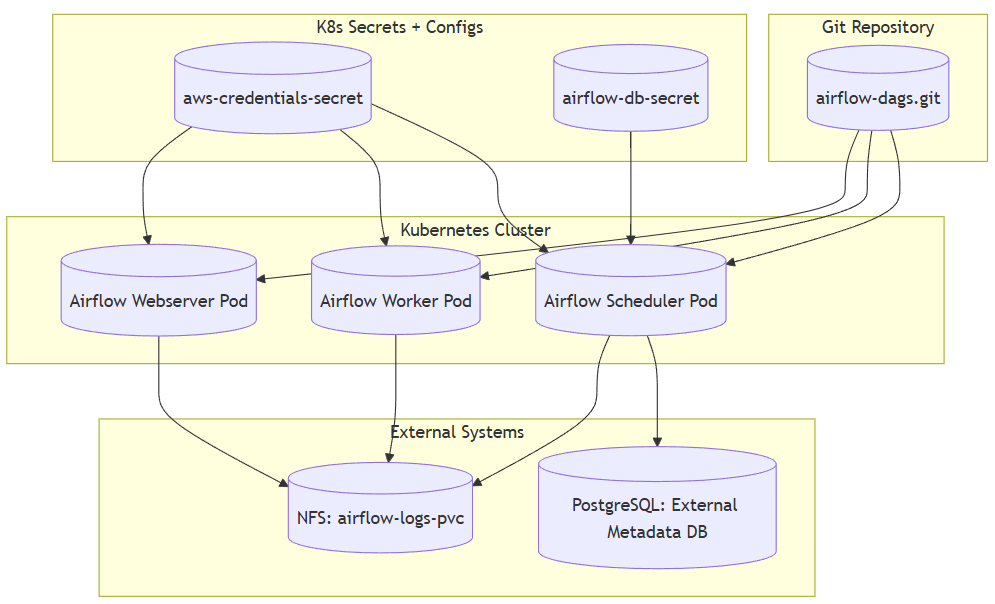
🐳 커스텀 Airflow 이미지 구성
GitSync DAG에서 MLflow 연동 또는 AWS SDK 사용을 위한 Python 패키지 설치가 필요합니다.
Dockerfile
FROM apache/airflow:3.0.2-python3.12

COPY requirements.txt /tmp/requirements.txt
USER airflow
RUN pip install --no-cache-dir -r /tmp/requirements.txt
requirements.txt
mlflow==2.13.0
pandas
scikit-learn
boto3
빌드 & 푸시
docker build -t hoizz/airflow-custom:v5-mlflow .
docker push hoizz/airflow-custom:v5-mlflow
🛠 Helm 구성
values.yaml (핵심 설정)
# 실행 엔진 설정
executor: KubernetesExecutor

# 이미지 설정
images:
  airflow:
    repository: hoizz/airflow-custom
    tag: v5-mlflow-20240712
    pullPolicy: IfNotPresent

# Fernet Key 고정 (helm delete & install 이후에도 Variables 등 데이터 유지)
fernetKeySecretName: my-fernet-secret

# DAG GitSync 설정 (GitOps 기반)
dags:
  gitSync:
    enabled: true
    repo: git@github.com:keonhoban/airflow-dags.git
    branch: main
    subPath: dags
    depth: 1
    wait: 10
    rev: HEAD
    sshKeySecret: airflow-git-ssh-secret

# DB 연동 (외부 PostgreSQL 사용)
postgresql:
  enabled: false  # 내부 Postgres 비활성화
data:
  metadataSecretName: airflow-db-secret

# Airflow 환경 설정
config:
  AIRFLOW__CORE__LOAD_EXAMPLES:
    value: "False"
  AIRFLOW__CORE__DAGS_ARE_PAUSED_AT_CREATION:
    value: "False"

# AWS 인증 마운트 (scheduler/workers/dagProcessor 공통)
scheduler:
  extraVolumes:
    - name: aws-credentials
      secret:
        secretName: aws-credentials-secret
  extraVolumeMounts:
    - name: aws-credentials
      mountPath: /home/airflow/.aws
      readOnly: true

# 로그 PVC 설정
logs:
  persistence:
    enabled: true
    existingClaim: airflow-logs-pvc
전체 코드: GitHub (values.yaml)
workers, dagProcessor에도 동일한 extraVolumes/extraVolumeMounts 설정이 필요합니다. Ingress는 apiServer 기반으로 airflow.local 호스트를 설정합니다.
🔑 Fernet Key 생성 및 구성
# 생성
python -c "from cryptography.fernet import Fernet; print(Fernet.generate_key().decode())"
apiVersion: v1
kind: Secret
metadata:
  name: my-fernet-secret
  namespace: airflow
type: Opaque
stringData:
  fernet-key: ""  # 생성한 값으로 수정
🔐 GitSync SSH Key & Secret 구성
# SSH 키 생성
ssh-keygen -t rsa -b 4096 -C "testuser@mlops.com"

# GitHub UI에서 Deploy Key 등록 (공개키)

# K8s Secret 생성 (비공개 키)
kubectl create secret generic airflow-git-ssh-secret --from-file=gitSshKey=/root/.ssh/id_rsa -n airflow
🚀 배포
kubectl create namespace airflow

helm install airflow apache-airflow/airflow -n airflow -f values.yaml
🌐 접속 확인
# /etc/hosts 수정
{NodeIP} airflow.local

# 브라우저 접속
http://airflow.local
🧪 검증
| 항목 | 확인 방법 |
|---|---|
| Airflow UI 접근 | http://airflow.local |
| DAG GitSync | GitHub push → 자동 반영 여부 확인 |
| PostgreSQL 연결 | metadata DB에 연결 로그 확인 |
| AWS 인증 연동 | boto3.client() 호출 시 에러 없는지 확인 |
🚨 트러블슈팅
GitSync DAG 미반영 시 체크 리스트
subPath경로 오류- Secret에 등록된 SSH key 권한 문제
- GitHub deploy key에 write 권한 누락
설계 판단 (Why This Way?)
KubernetesExecutor는 Task마다 Pod를 동적 생성/삭제하여 CeleryExecutor 대비 리소스 효율이 높고, Fernet Key를 Secret으로 고정해야 재배포 후에도 암호화된 Variables/Connections를 복호화할 수 있습니다. GitSync는 depth=1로 최신 커밋만 clone하고, 각 컴포넌트(scheduler, workers, dagProcessor)마다 독립적으로 AWS credentials를 마운트해야 합니다.
다음에 읽을 글
→ MLOps 플랫폼 구축 5단계: FastAPI 서빙 및 핫스왑 구조 구축 — MLflow 모델 연동 FastAPI 서빙과 핫스왑